MCP Setup
To unlock the full workflow (Jira, Figma, code search, browser automation), you need to configure the MCP (Model Context Protocol) servers. Copilot Collections provides a ready-to-use template in .vscode/mcp.json.
Installation Options
Option 1: User Profile (Recommended)
This enables the MCP tools globally across all your projects.
- Open the Command Palette:
CMD+Shift+P(macOS) orCtrl+Shift+P(Windows/Linux). - Type and select "MCP: Open User Configuration".
- This will open your global
mcp.jsonfile. - Copy the contents of the
mcp.jsonconfiguration below and paste them into your user configuration file.
Option 2: Workspace Configuration
Use this if you want to enable these tools only for a specific project.
- Copy the
mcp.jsonconfiguration below. - Save it as
.vscode/mcp.jsonin your target project (e.g.,my-project/.vscode/mcp.json).
MCP Configuration
Here is the full mcp.json configuration with all 5 servers:
{
  "servers": {
    "playwright": {
      "command": "npx",
      "args": ["@playwright/mcp@latest"],
      "type": "stdio"
    },
    "context7": {
      "type": "stdio",
      "command": "npx",
      "args": ["-y", "@upstash/context7-mcp@latest"]
    },
    "sequential-thinking": {
      "command": "npx",
      "args": ["-y", "@modelcontextprotocol/server-sequential-thinking"],
      "type": "stdio"
    },
    "figma": {
      "url": "https://mcp.figma.com/mcp",
      "type": "http"
    },
    "atlassian": {
      "url": "https://mcp.atlassian.com/v1/mcp",
      "type": "http"
    }
  },
  "inputs": []
}
MCP Server Reference
Each MCP server enables specific capabilities within the workflow:
| MCP Server | Purpose | Used By |
|---|---|---|
| 🧩 Atlassian | Access Jira issues and Confluence pages for research, planning, implementation, and review | Business Analyst, Architect, Software Engineer, Code Reviewer |
| 🎨 Figma MCP | Pull design details, components, and variables for design-driven work | Software Engineer (UI), UI Reviewer |
| 📚 Context7 | Semantic search in external documentation and knowledge bases | All agents |
| 🧪 Playwright | Interactive browser automation and UI debugging from Copilot | Software Engineer, E2E Engineer |
| 🧠 Sequential Thinking | Advanced reasoning for complex problem analysis, revision, and branching | All agents (for complex tasks) |
MCP setup is only part of the Figma-backed UI verification workflow. EXPECTED still comes from Figma MCP, but ACTUAL capture is produced by tsh-ui-capture-worker through Playwright CLI artifacts. To use that flow, keep the target app running, confirm the exact full dev server URL when asked, and make sure playwright-cli is available (npx playwright-cli or a global install).
Configuring Context7 API Key
To get higher rate limits and access to private repositories, you can provide a Context7 API key. Get your key at context7.com/dashboard.
Copilot Collections uses VS Code's inputs feature to securely prompt for the API key. When you first use the Context7 MCP, VS Code will ask for the key and store it securely.
To enable this, modify your mcp.json configuration (User or Workspace) to use the --api-key CLI argument with an input variable:
{
  "servers": {
    "context7": {
      "type": "stdio",
      "command": "npx",
      "args": [
        "-y",
        "@upstash/context7-mcp@latest",
        "--api-key",
        "${input:context7-api-key}"
      ]
    }
  },
  "inputs": [
    {
      "id": "context7-api-key",
      "description": "Context7 API Key (optional, for higher rate limits)",
      "type": "promptString",
      "password": true
    }
  ]
}
Server IDs in mcp.json are lowercase (e.g., context7, figma). If you copied an older template with different names, update your configuration to match the current template.
After Installation
Once you've copied the configuration, here's what to do:
- Start using Copilot — simply send a message in Copilot Chat. VS Code will start the MCP servers automatically.
- Authenticate when prompted — for Atlassian and Figma, your browser will open asking you to log in and authorize access. Just follow the prompts.
- (Optional) Add a Context7 API key — Context7 works out of the box with rate limits. For higher limits, see Configuring Context7 API Key below.
That's it — no extra commands or manual wiring needed.
Verify Your Setup
To confirm all MCP servers are running correctly:
- Open the Command Palette:
CMD+Shift+P(macOS) orCtrl+Shift+P(Windows/Linux). - Type and select "MCP: List Servers".
- You should see all servers listed with a Running status:
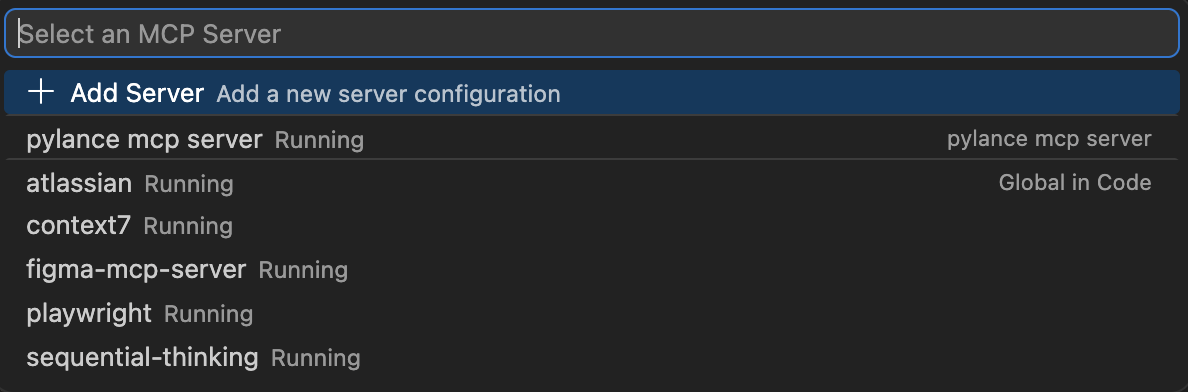
If any server shows a different status, try restarting VS Code or check the Authentication Requirements section below.
Authentication Requirements
Some MCP servers require additional setup:
- Atlassian — Requires Atlassian account authentication. The HTTP MCP endpoint handles OAuth automatically via your browser.
- Figma — Requires Figma account access. The HTTP MCP endpoint handles authentication via your browser.
- Context7 — Works without an API key (with rate limits). Optional API key for higher limits.
- Playwright — No authentication required. Runs locally via npx.
- Sequential Thinking — No authentication required. Runs locally via npx.